
When setting up a customer club integration, you need to decide the period over which members earn points.
In this guide, you’ll get an understanding of how fixed and dynamic earning periods work and how they are set up.
Earning period – Fixed
With a fixed earning period, you define a specific start and end date for when members earn points and when they can use them.
Earning and usage periods repeat automatically. So when the same date comes around the following year, the earning period starts again. The date set on the integration is therefore the start date of the integration.
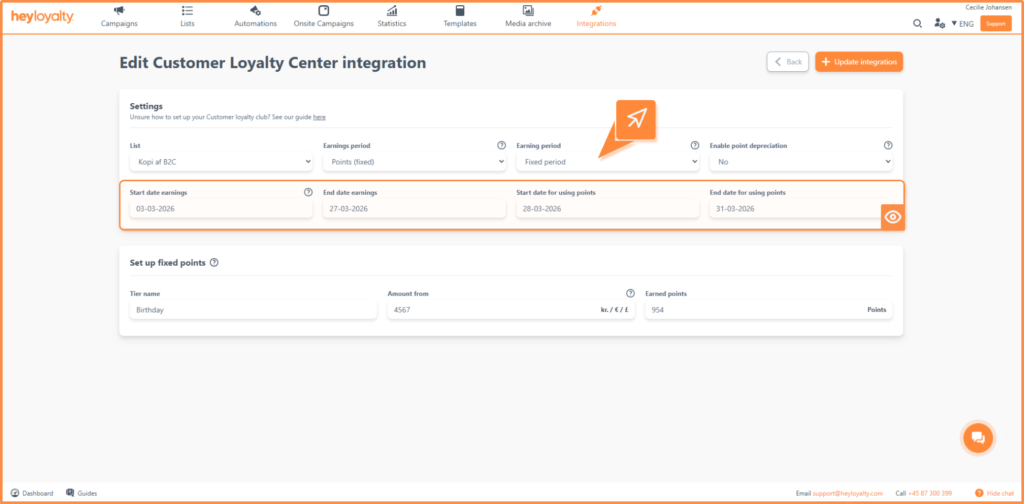
The following must be filled in for the fixed earning period:
- Earning start date: The date when members start earning points.
- Earning end date: The date when members stop earning points.
- Points usage start date: The date when members can start using earned points.
- Points usage end date: The date on which points expire if members have not used them.
Example – fixed period
The example uses the Percentage discount (step) earning type.
These steps are set up:
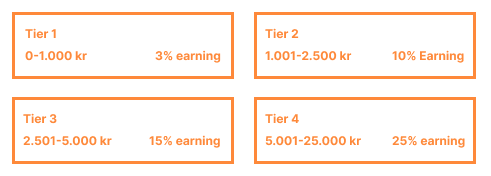
Selected periods
- Earning period
Start: January 1, 2026
End: March 30, 2026
- Usage period
Start: March 31, 2026
End: June 30, 2026
Result for a member
For a customer club member, the earning and usage periods can look like this:
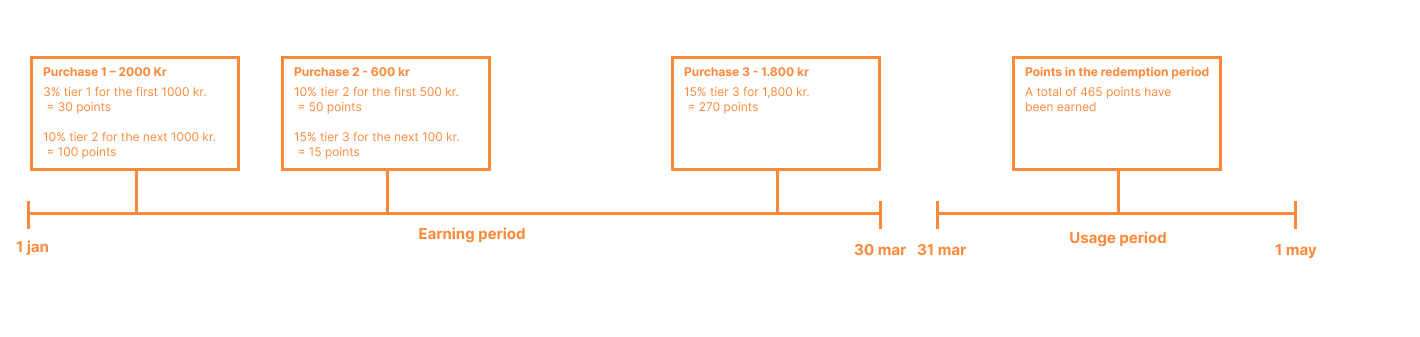
In this example, when the earning period is over, a new earning period will not start until January 1, 2027, and the next usage period therefore starts on March 31, 2027.
Earning period – Dynamic
A dynamic earning period works differently from the fixed one – there is no common start or end date for all members. Instead, the period starts individually for each member the first time they make a purchase.
This means that:
- Points are awarded continuously
- Points expire continuously
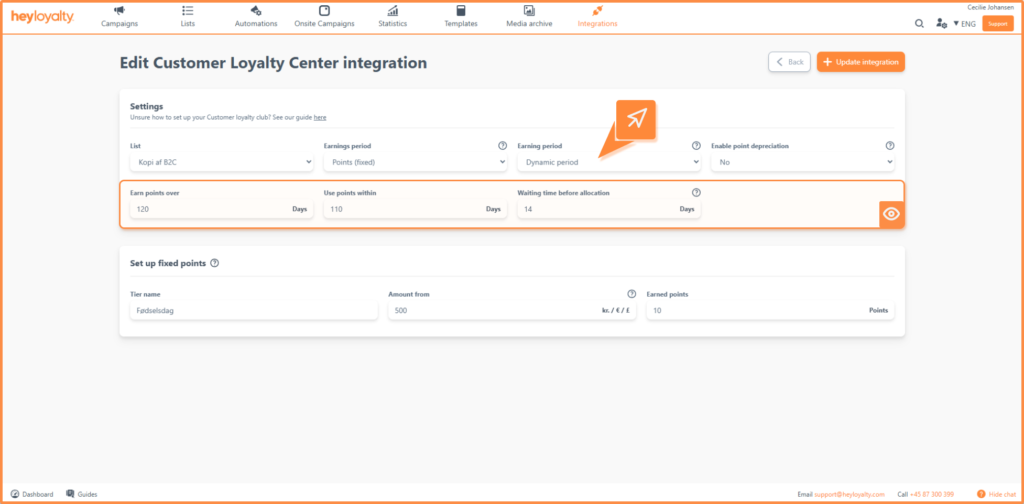
The following settings must be configured for the dynamic period:
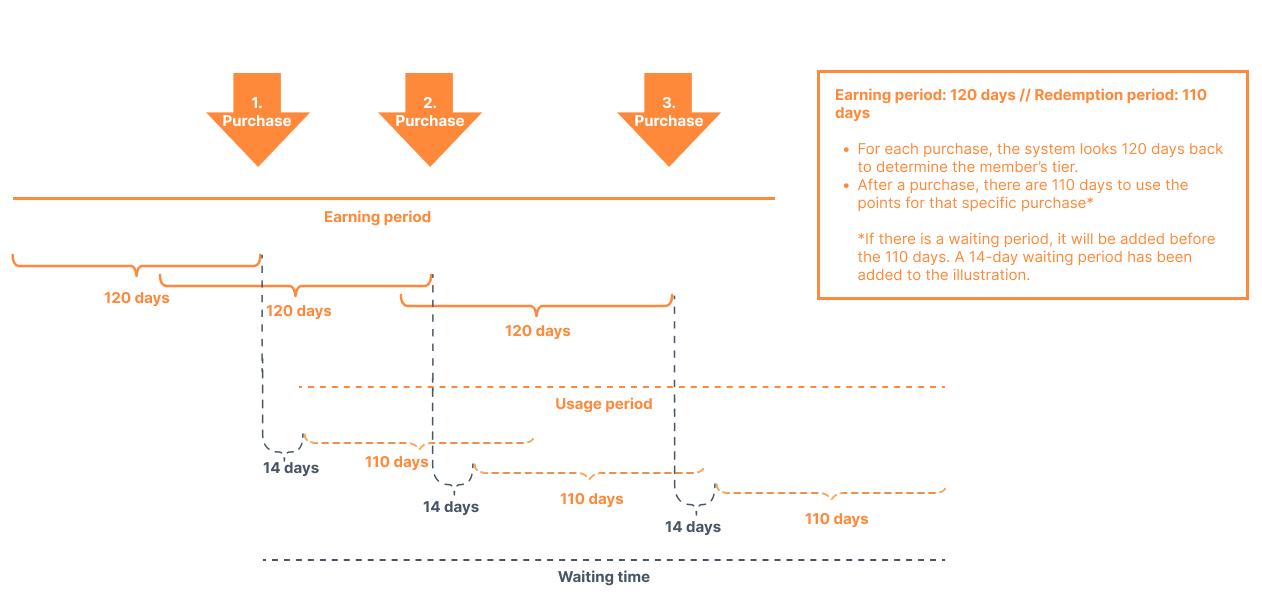
- Earn points over: Specifies the number of days over which the member’s purchases are added up. If this is set to 160, each purchase looks back at the purchases made in the last 160 days to calculate the member’s step and thus the points for the current purchase.
When the 160 days have passed, the points for this purchase expire for the earning period. If the member makes later purchases, points can still be used, as these purchases have their own earning and expiration periods. - Waiting time before awarding: Indicates how many days pass before the earned points become available to use. This is used, for example, to handle returns – if a customer changes their mind about a purchase, the points are canceled before they can be used.
- Use points within: Indicates how many days a member has to use their released points before they expire.
If the member makes another purchase in the meantime, a new “counter” starts for the new points – they follow the same rules, but with their own starting point.
Example – dynamic period
The dynamic period is set up with the settings below:
- Earn points over: 120 days
- Waiting time before awarding: Points are released after 14 days
- Use points within: 110 days after the points are released
This is how it works for one member:
- Day 0 – The member makes a purchase. The points are earned but not yet available.
- Day 14 – The wait is over. The points are released and can now be used in the shop.
- Day 14-124 – The member has 110 days to use their points before they expire.
- Day 120 – The earning period ends. Any points not yet released will be forfeited.
The period for earning and using points is therefore dynamic and can be illustrated as follows:
Choose the earning period that suits your customer club
Based on the above, you now need to choose which earning period best supports your customer club’s purpose and customer behavior.
A fixed period provides structure and clear deadlines that can motivate members to act within a specific timeframe.
A dynamic period, on the other hand, creates a more flexible and individualized experience where earning and using points follow each member’s activity.
So think carefully about what works best for your business and your customers – and how you want to drive engagement and repeat purchases in your customer club.

If you need information or help that you cannot find here on the guide site, you are always welcome to contact our support!
support@heyloyalty.com